准备 服务域名。 服务域名对应的SSL证书。 一台服务器。 安装环境 系统: Centos 7 配置信息:1H/2G/5M
架构 Unbound Unbound负责解析、缓、转发查询、 DNS-OVER-TLS
DOH Server 提供 DNS-OVER-HTTP 服务
NGINX 将DNS-OVER-HTTP转DNS-OVER-HTTPS
安装 1、配置安装环境 1 2 3 4 5 6 7 8 yum install -y crontabs yum install -y wget gcc tar zip redhat-lsb gawk unzip net-tools psmisc glibc-static expect telnet yum install -y openssl openssl-devel lzo lzo-devel pam pam-devel automake yum install -y autoconf libtool make build-essential curl curl-devel zlib-devel perl perl-devel perl-core cpio expat-devel gettext-devel git asciidoc xmlto yum -y install epel-release bind-util libevent libevent-devel yum install python-setuptools -y && easy_install pip yum install python-devel libffi-devel -y yum group install 'Development Tools' -y
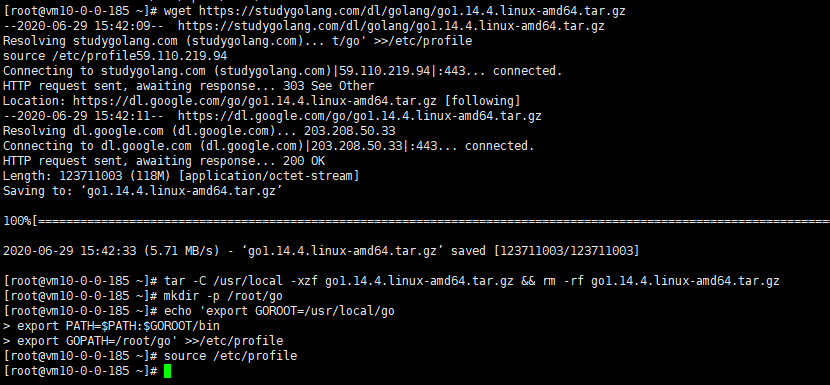
2、安装Go dns-over-https 服务基于Go语言编写,所以需要安装GO语言环境。 下面的Go是Linux x86-64的安装包,如果你得机器是其他架构,请到https://studygolang.com/dl 选择自己机器对应的安装包。
1 2 3 4 5 6 7 wget https://studygolang.com/dl/golang/go1.18.2.linux-amd64.tar.gz tar -C /usr/local -xzf go1.18.2.linux-amd64.tar.gz && rm -rf go1.18.2.linux-amd64.tar.gz mkdir -p /root/go echo 'export GOROOT=/usr/local/go export PATH=$PATH:$GOROOT/bin export GOPATH=/root/go' >>/etc/profile source /etc/profile
安装Go
配置国内镜像,国外服务器跳过下面步骤
1 2 go env -w GO111MODULE=on go env -w GOPROXY=https://goproxy.cn,direct
配置国内镜像源
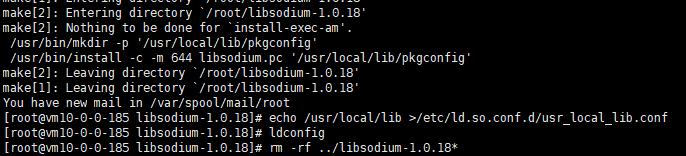
3、安装libsodium 1 2 3 4 5 6 7 cd /root wget -N --no-check-certificate https://cdn.nextrt.com/dns/soft/libsodium-1.0.18.tar.gz tar xf libsodium-1.0.18.tar.gz && cd libsodium-1.0.18 ./configure && make -j2 && make install echo /usr/local/lib >/etc/ld.so.conf.d/usr_local_lib.conf ldconfig rm -rf ../libsodium-1.0.18*
安装libsodium
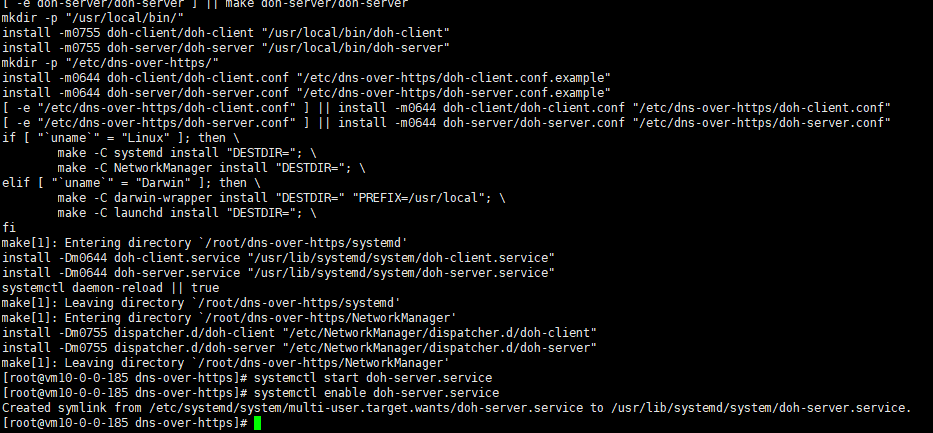
4、安装DOH Server 1 2 3 4 5 6 cd /root git clone https://github.com/m13253/dns-over-https.git cd dns-over-https make && make install systemctl start doh-server.service systemctl enable doh-server.service
安装DOH Server
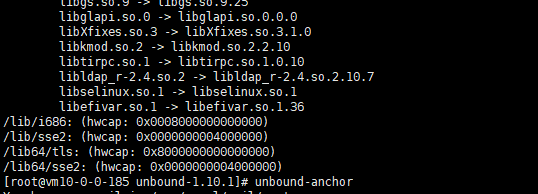
5、安装Unbound 1 2 3 4 5 6 7 wget https://nlnetlabs.nl/downloads/unbound/unbound-1.15.0.tar.gz --no-check-certificate tar -zxvf unbound-1.15.0.tar.gz && rm -rf unbound-1.15.0.tar.gz && cd unbound-1.15.0 && ./configure --enable-subnet --with-libevent --with-pthreads --with-ssl --enable-dnscrypt make && sudo make install curl -o /usr/local/etc/unbound/root.hints ftp://ftp.internic.net/domain/named.cache /sbin/ldconfig -v unbound-anchor mkdir /etc/unbound
安装Unbound
配置 配置Unbound 以下是部分需要自己配置的地方文件说明
1 2 3 4 5 6 7 8 9 10 11 12 13 14 15 16 17 18 server: verbosity: 1 interface: 0.0 .0 .0 @50 interface: 0.0 .0 .0 @853 do-ip6: no num-threads: CPU核心数 msg-cache-slabs: CPU核心数 rrset-cache-slabs: CPU核心数 key-cache-slabs: CPU核心数 infra-cache-slabs: CPU核心数 include: "/etc/unbound/insecure.conf" tls-port: 853 tls-service-key: "TLSKEY" tls-service-pem: "TLSCERT" include: "/etc/unbound/forward.conf" include: "/etc/unbound/domestic.conf"
国内机器配置文件参考 1 2 3 4 5 6 7 8 9 10 11 12 13 14 15 16 17 18 19 20 21 22 23 24 25 26 27 28 29 30 31 32 33 34 35 36 37 38 39 40 41 42 43 44 45 46 47 48 49 50 51 52 53 54 55 56 57 58 59 60 61 62 63 64 65 66 67 68 69 70 71 72 server: verbosity: 1 interface: 0.0 .0 .0 @50 interface: 0.0 .0 .0 @853 username: "root" access-control: 0.0 .0 .0 /0 allow access-control: ::1 allow do-ip4: yes do-ip6: no do-udp: yes do-tcp: yes num-threads: 1 msg-cache-slabs: 1 rrset-cache-slabs: 1 key-cache-slabs: 1 infra-cache-slabs: 1 log-servfail: yes aggressive-nsec: yes hide-trustanchor: yes hide-version: yes hide-identity: yes qname-minimisation: yes qname-minimisation-strict: no minimal-responses: yes rrset-roundrobin: yes so-reuseport: yes do-not-query-localhost: yes infra-cache-numhosts: 10000 so-rcvbuf: 8m so-sndbuf: 8m neg-cache-size: 32m msg-cache-size: 64m key-cache-size: 64m neg-cache-size: 32m rrset-cache-size: 128m outgoing-range: 8192 num-queries-per-thread: 4096 outgoing-num-tcp: 1024 incoming-num-tcp: 2048 jostle-timeout: 300 cache-min-ttl: 120 cache-max-ttl: 86400 infra-host-ttl: 3600 serve-expired-ttl: 86400 cache-max-negative-ttl: 360 serve-expired: yes prefetch: yes prefetch-key: yes max-udp-size: 4096 edns-buffer-size: 4096 send-client-subnet: 0.0 .0 .0 /0 send-client-subnet: ::0/0 max-client-subnet-ipv6: 56 max-client-subnet-ipv4: 24 client-subnet-always-forward: yes module-config: "subnetcache validator iterator" root-hints: "root.hints" auto-trust-anchor-file: "/usr/local/etc/unbound/root.key" tls-cert-bundle: "/etc/pki/tls/certs/ca-bundle.crt" minimal-responses: yes include: "/etc/unbound/insecure.conf" tls-port: 853 tls-service-key: "/www/server/panel/vhost/cert/dns.233py.com/privkey.pem" tls-service-pem: "/www/server/panel/vhost/cert/dns.233py.com/fullchain.pem" include: "/etc/unbound/forward.conf" include: "/etc/unbound/domestic.conf"
国外机器请删除上面文件
1 2 include: "/etc/unbound/forward.conf" include: "/etc/unbound/insecure.conf"
配置DNS-OVER-HTTP 编辑/etc/dns-over-https/doh-server.conf修改内容为下方所示
1 2 3 4 5 6 7 8 9 10 11 12 13 14 15 16 17 # HTTP listen port listen = [ "127.0.0.1:8053", "[::1]:8053", ] local_addr = "" cert = "" key = "" path = "/dns-query" upstream = [ "udp:127.0.0.1:50" ] timeout = 6 tries = 3 verbose = false log_guessed_client_ip = false
配置文件自动更新 因为高防dns列表和转发列表可能每天都在更新所以需要添加一个定时任务来执行以下脚本,具体怎么添加不做赘述,请自行添加。
1 2 3 4 5 6 7 8 9 10 11 12 13 # !/bin/bash echo Restart DNS Serve... echo "更新转发配置文件" curl -o /etc/unbound/forward.conf https://download.233py.com/dns/update/forward.conf curl -o /etc/unbound/domestic.conf https://download.233py.com/dns/update/domestic.conf curl -o /etc/unbound/insecure.conf https://download.233py.com/dns/update/insecure.conf echo "重启Unbound" killall unbound unbound -v echo "重启DOH" systemctl restart doh-server.service echo "重启完成" exit 0;
进程检查,防止宕机 每分钟运行下面脚本,防止Unbound进程挂了。
1 2 3 4 5 #!/bin/bash PIDS=`ps -ef grep unbound grep -v grep awk '{print $1}' ` if [ "$PIDS " == "" ]; then unbound -v fi
放行防火墙 1 2 3 4 5 firewall-cmd --permanent --zone=public --add-port=853/tcp firewall-cmd --permanent --zone=public --add-port=443/tcp firewall-cmd --permanent --zone=public --add-port=80/tcp firewall-cmd --reload setenforce 0
配置Nginx 之前dns-over-https服务只是实现dns-over-http而https工作交由nginx来实现。 在nginx配置文件中添加以下内容
1 2 3 4 5 6 7 8 9 10 11 12 13 14 15 16 17 18 19 20 location /dns-query { proxy_set_header X-Real-IP $remote_addr ; proxy_set_header X-Forwarded-For $proxy_add_x_forwarded_for ; proxy_set_header Host $host ; proxy_set_header REMOTE-HOST $remote_addr ; proxy_set_header X-NginX-Proxy true ; proxy_http_version 1 .1 ; proxy_set_header Upgrade $http_upgrade ; proxy_redirect off ; proxy_set_header X-Forwarded-Proto $scheme ; proxy_read_timeout 86400 ; proxy_pass http://127.0.0.1:8053/dns-query; add_header X-Cache $upstream_cache_status ; proxy_ignore_headers Set-Cookie Cache-Control expires; proxy_cache cache_one; proxy_cache_key $remote_addr $uri $is_args $args ; proxy_cache_valid 200 304 301 302 1m ; expires 12h ; }